> ## Documentation Index
> Fetch the complete documentation index at: https://glassray.ai/docs/llms.txt
> Use this file to discover all available pages before exploring further.
# Connect PostHog
> Connect PostHog so Glassray pulls your LLM observability traces on a sync cadence.
Glassray connects to PostHog as a **pull** integration: you provide a personal API key, region, and project, and Glassray fetches new traces on a sync cadence. It reads your **LLM observability** (`$ai_*`) events, so your app needs to be sending them with the [PostHog AI SDK](https://posthog.com/docs/ai-observability). It's one of four [trace integrations](/traces) - the others are [Langfuse](/langfuse), [LangSmith](/langsmith), and [OpenTelemetry](/otlp-ingestion).
## Connect
In the dashboard, go to **Settings → Sources** and add **PostHog**.
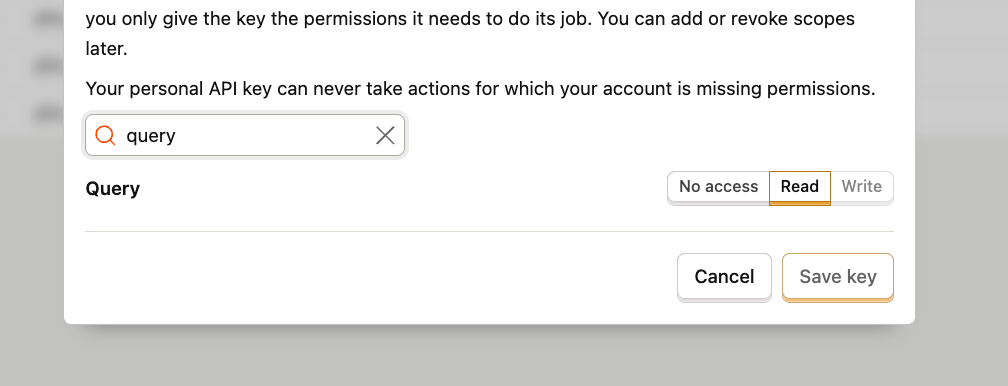
In PostHog, go to **Settings → Personal API keys** and create a new key. When selecting scopes, search for **query** and set the **Query** scope to **Read** (`query:read`).
 Paste the key into Glassray and choose your **region** (US or EU). If you're self-hosted, enter your **host URL** instead.
Enter the PostHog **project ID** to pull traces from. You can find it in PostHog under **Settings → General**.
Glassray verifies the credentials and starts pulling new traces on a cadence.
Your PostHog credentials are stored in **WorkOS Vault**, never in Glassray's database. The connected source row only holds a reference to the vaulted secret.
## Filtering
A source can carry an optional **filter** so only the runs you care about are pulled - narrow by trace name and scope. Filtering is applied at ingest, and changes are go-forward (re-sync to apply a new filter). See [Traces](/traces).
Prefer to push instead of pull? Use [OpenTelemetry](/otlp-ingestion). Once traces land, head to [Flows](/flows) or [Ask Glassray](/ask-glassray).
Paste the key into Glassray and choose your **region** (US or EU). If you're self-hosted, enter your **host URL** instead.
Enter the PostHog **project ID** to pull traces from. You can find it in PostHog under **Settings → General**.
Glassray verifies the credentials and starts pulling new traces on a cadence.
Your PostHog credentials are stored in **WorkOS Vault**, never in Glassray's database. The connected source row only holds a reference to the vaulted secret.
## Filtering
A source can carry an optional **filter** so only the runs you care about are pulled - narrow by trace name and scope. Filtering is applied at ingest, and changes are go-forward (re-sync to apply a new filter). See [Traces](/traces).
Prefer to push instead of pull? Use [OpenTelemetry](/otlp-ingestion). Once traces land, head to [Flows](/flows) or [Ask Glassray](/ask-glassray).